
Prepare your Page audience
Fetch existing conversations, then check the result before your first campaign.
Before you start
A connected account and a linked Page.
Fetch the conversation audience
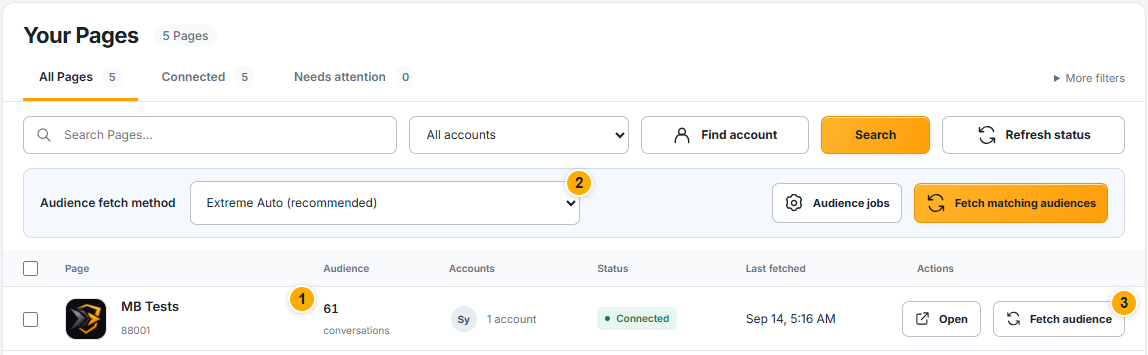 Screenshot from a demo account · Open full size
- 1
Choose your Page. Check its name and connection status before fetching.
- 2
Review Audience fetch method. Start with the recommended method displayed by the site.
- 3
Select Fetch audience beside that Page. For a bulk action, first confirm the filters because matching audiences can include several Pages.
Expected result
A fetch request is accepted or the page explains what prevents it. The final count is available after completion.
This audience contains existing Page conversations, not followers or arbitrary Facebook users.
Follow completion and review recipients
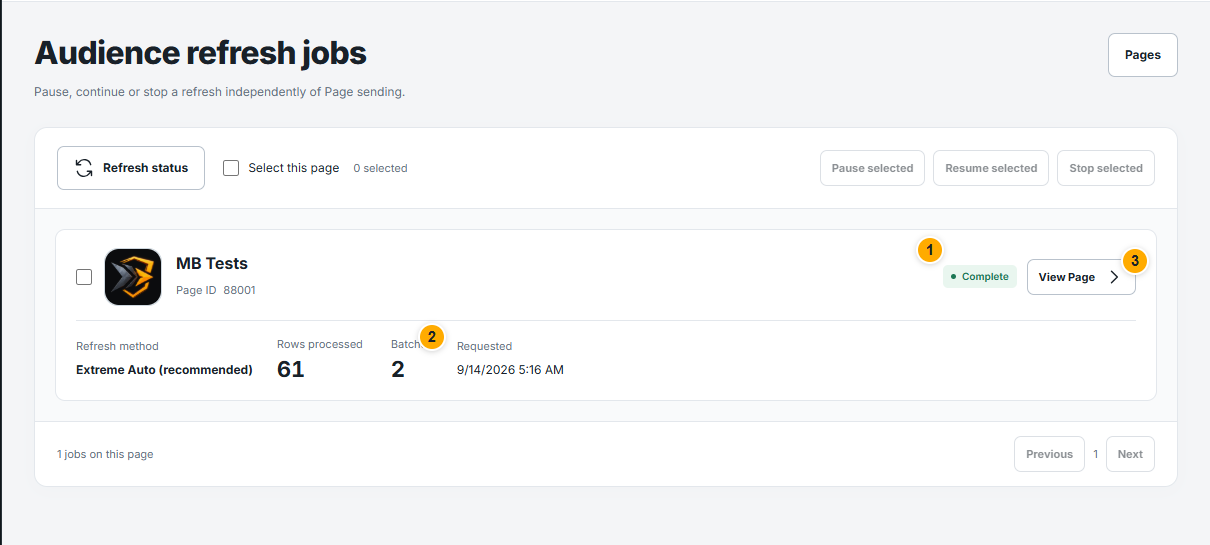 Screenshot from a demo account · Open full size
- 1
Open Audience jobs. Identify the task for the Page and check whether it is waiting, running, complete or requires attention.
- 2
Review Rows processed and Batches. These are progress counters; check that the job is Complete before treating the refresh as finished.
- 3
Choose View Page to inspect the available audience and conversation filters. Blocking a recipient there prevents future sends; messages already sent cannot be recalled.
Expected result
You know which conversation audience is ready for selection in a campaign.
Something not working as expected?
- Zero conversations? Confirm that this Page has existing conversations and that the job completed. Followers alone do not form a sendable audience.
- Partial or failed fetch? Read the task message and check the linked account. Review completed work before starting another fetch; a queued task may still be working.